
Augusto Vocos
@augustovocos
Published work
Argentine Mutual Funds (FCI) Data — Architecture Guide
All organized under Comisión Nacional de Valores (CNV) — Fondos Comunes de Inversión: | Repo | Contents | |---|---| | Daily Net Asset Value & Share Data | Daily NAV / shares / unit price feed — yearly shards, plus per-category breakouts | | Daily Net Asset Value & Share Data — A to Z | Same daily NAV feed, partitioned by fund-name initial letter (26 datasets, A–Z) | | Holdings | Weekly portfolio composition: instrument-level holdings, aggregates, cheque detail | | Total Return & Tear Sheets | Total-return indices and performance summaries (per fund, per class, per manager, per category, industry-wide) | | Flows | Subscription vs price-effect decomposition (per fund, per category, industry-wide, CER subset) | The three layers of data 1. Daily NAV feed — primary valuation (Daily Net Asset Value & Share Data and Daily Net Asset Value & Share Data — A to Z) Ingested daily from CNV. Each row is one fund-class on one day with its unit price, shares outstanding, total net assets and classification metadata. The same underlying daily feed is partitioned three ways for query performance: By year (Daily Net Asset Value & Share Data): one dataset per calendar year —...
How to create a Deck of views in Alphacast?
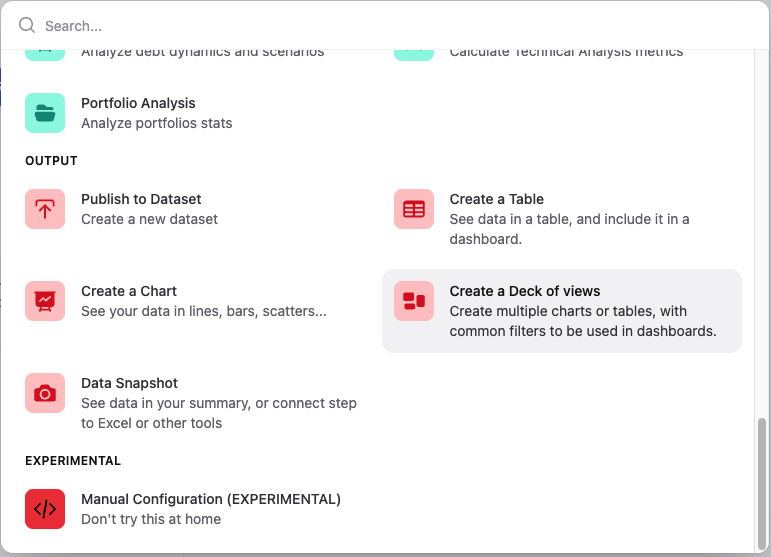
Once the Deck is created, you can add a Chart or a Table view from the Add view button. You can add as many views as you want; each view can be linked to a specific series of the dataset. After choosing the view type, you can select the series that will be used as input for that view. The entities associated with those series automatically become the filters of the Deck. Also, you can edit each view separately, modifying titles, subtitles, units, etc. Clipping views and creating an Insight After configuring the views, the final step is to clip the Deck using the button Add to clips on the top right corner. Clipping freezes the current configuration of the view, including the selected filters and layout. Once clipped, the view can be embedded into a Dashboard. Dashboards allow you to embed the clipped view into reports while preserving its interactive behavior. In the Edit mode of a Dashboard, go to the Clips button; you will find the clipped Deck under the Decks section. Inside the clipped Deck, you will see separate items for Filters and for the Chart and/or Table. To add them to the Dashboard, simply drag the...
Alphacast High Frequency CPI - December 29th 2025 to January 4th 2026

Inflation accelerated on a weekly basis. Consumer prices rose 0.7% WoW, up from the prior week’s revised 0.59%. On a monthly basis, inflation picked up to 2.2% MoM, preserving the prior week’s run rate. Furthermore, the annual rate held steady at 30% YoY. During the reference week, core and seasonal prices heated up WoW, while regulated prices eased significantly. Core inflation climbed to 1% WoW, up from a revised 0.8% the week before. On a monthly basis, core inflation intensified to 2.3% MoM. Seasonal items rose 0.74% WoW (vs. a revised 0.56% previously), while their monthly pace accelerated to 1.7% MoM. Regulated prices increased 0.1% WoW (vs. a revised 0.3% previously), while their monthly pace rebounded to 2.3% MoM. Note: This week, we are sharing a shortened version of the report as we are currently in the midst of migrating and upgrading our pricing system. Very soon, the new system will go live and enable us to publish core inflation indices with daily updates, which will be made directly available in Alphacast’s datasets. This enhancement marks a significant step toward greater accuracy and frequency in inflation tracking, further facilitating real-time analysis. Thank you for joining us in this transformation process....